
Parking is included in your convention registration fee. Please follow one of the two series of steps below to park at the Abromson Center at USM.
To Register Ahead

1) Scan the QR code at right or click this link.
2) Click on the ‘Reservation’ tab at the top right.
3) Select location to park (Portland Campus-Garage 1).
4) Select date and times you will be on-campus
5) Click next and fill out customer details.
6) Click next and fill out vehicle details.
7) In the right-hand box, check ‘Apply Promo Code’
8) Enter DIOME26 into the box and click apply.
9) Click next’and confirm booking.
Download a PDF of these instructions
To Register on the Day of Convention
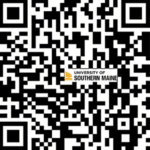
1) Scan the QR code at right.
2) Enter phone number and license plate number
3) In Validation Code box, input DIOME26 and select apply
4) Under Rate Band, select amount of time you would like to park—day pass is recommended
5) Select Start Parking. You will receive a confirmation email and text for your parking. No further action is required upon leaving the event.
Download a PDF of these instructions
Questions? Contact [email protected]